Nic On Lumix
Thriller (LUT) 2 Looks in 1


Thriller LUT - Look 1 (Rec709 & No iDynamic)
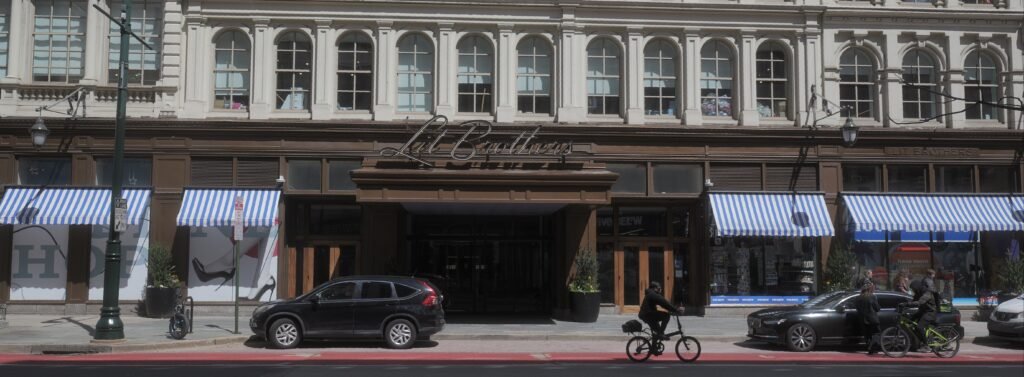
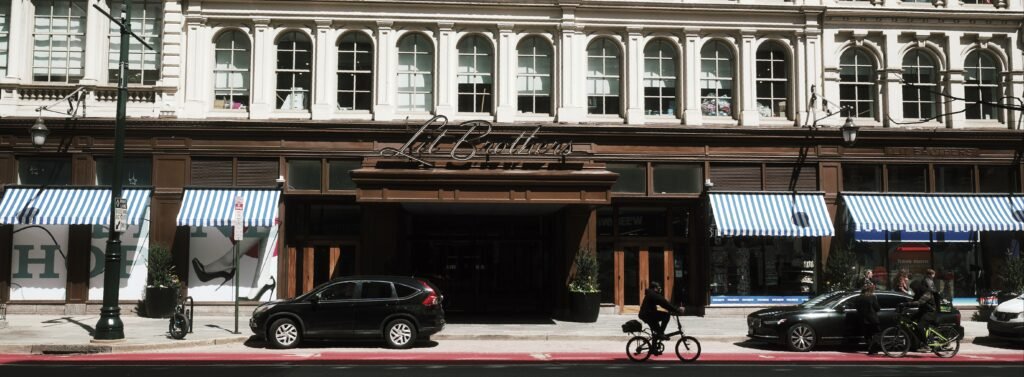
Thriller LUT - Look 2 (Flat Profile + iDynamic High)
I tend to lean into the bright, sunny, nostalgic look with a lot of my Lumix LUTs. But I also love cinematography and sometimes a scene demands something more dramatic and gritty. A good color grade can really add a layer of storytelling to a scene in much the same way good audio can make or break a production.
I built the Thriller LUT to be adaptable, specifically for those moments where a dramatic, deliberate look is desired or a softer more timeless look is the aim. It’s a stylized color grade designed to get the suspenseful, moody aesthetics of modern psychological thrillers and gritty 1970s cinema or the timeless beauty of Kodak film stocks straight out of your Lumix without requiring a massive log-grading workflow.
Look 1 (A More Cinematic Grade):
This LUT completely abandons natural, true-to-life color reproduction in favor of something a little more heavy. It leans hard into the visual style of David Fincher films and 90’s early 2000’s thrillers to create something dramatic. Paired with the Rec 709L color profile, it creates a nice cinema grade.
The Cinematic Wash: The LUT introduces a distinct, greenish aqua tint across the midtones and highlights, creating something stylized and film-like.
Moody Skin Tones: It subtly strips away some of the natural pinks and reds from human subjects. Skin tones are slightly desaturated with a mix of magentas and reds added across the color curve.
Crushed, Warm Shadows: The shadows are heavily crushed to create deep, punchy contrast, but the deepest blacks are intentionally lifted and infused with a muddy olive tone to add an analog feel to your shots.
Muted Environmentals: Environmental colors are aggressively subdued. Lush greens shift to military khaki, while skies and water become dark, desaturated teals. Primarily rust, orange, and brown tones pop against the soft teal wash.
Look 2 (35mm Film Look with Preserved Detail and Dynamic Range):
If you want to preserve as much detail as possible in a high-contrast environment, this look 2 works really well. It pushes the colors while maintaining a wide dynamic range.
Preserved Dynamic Range: Because it uses iDynamic on high, it actively recovers shadow and highlight details without crushing your blacks or blowing out the sky. The look is reminiscent of analog film.
Color Separation: It forces distinct color separation, pushing deep reds and orange while shifting blues to a soft teal. The result is a nice color contrast with soft overall color tones
Soft Highlights: Look 2 is far less punchy than Look 1 and offers a gentle highlight roll off to combat harsh contrast environments and avoid clipping.
Textured Shadows: Details in the shadows remain visible rather than being crushed.
Real-World Testing with Minimal Gear
I’m a big believer in getting cinematic results without a massive gear footprint. My entire setup for testing these looks was simply my Lumix S5IIX and a Nikon Nikkor 70-210 lens with a cheap adapter (this lens softens the image and adds a vignetting effect).
You don’t need an expensive cinema lenses to get a stylized look. In fact, the adapted vintage lens helps to add some character to the shots and reduces the digital sterility that sometimes comes straight out of camera on Lumix cameras. The heavy film grain baked into this LUT also adds some distinction to the look and can be adjusted to suit your taste.
What this LUT does well is create two stylized and distinct looks that harken back to another era.
Camera Settings (Look 1):
To get this exact look in-camera, the LUT provides the heavy atmospheric lifting, and your Lumix’s Photo Style menu dials in the foundation.
The Rec 709L profile gives a great starting gamma curve that prevents clipping, while bumping the in-camera saturation gives the stylized colors enough data to work with. If you want to use this LUT with the standard color profile, you may just want to lower the opacity and adjust your contrast to get something close to what Rec 709L offers.
Here are the exact in-camera settings for my sample shots:
Profile: 709L
White Balance: Manually adjusted Kelvin (Tune this to the specific lighting of your scene to control exactly how heavy the green/yellow wash sits)
iDynamic: Off
Contrast: 0
Highlight: 0
Shadow: 0
Saturation: 2
Hue: +3.5
Grain: Low
Color Noise: Off
Noise Reduction: 0
Sharpness: 0
Camera Settings (Look 2):
The flat color profile and iDynamic transform this LUT from something dramatic and crunchy to something softer and better suited for preserving details in demanding environments. Because iDynamic tends to brighten up shots, I tend to meter between -1/3 and -1 to preserve as much highlight detail as possible while still retaining some shadows as well.
Here are the exact in-camera settings for my sample shots:
Profile: Flat
White Balance: Manually adjusted Kelvin (Tune this to the specific lighting of your scene to control exactly how heavy the green/yellow wash sits)
iDynamic: High
Contrast: 0
Highlight: 0
Shadow: 0
Saturation: 0
Hue: 0
Grain: Low
Color Noise: Off
Noise Reduction: 0
Sharpness: 0
How to Use This LUT
This is built specifically for the 709L or Flat profiles to create two very different looks. Depending on where you’re shooting, shifting the color profile and iDynamic will give you a ton of options for where and how you shoot with Thriller. I’d recommend adding it to your Lumix Lab app to play around with the settings and dial it in to suit your style.
The white balance will also make a significant difference in your final results. I adjust the Kelvin manually for each of these shots. I find I get better results adjusting Kelvin than I do with the AWB options on the camera.


Thriller LUT - Look 1 (Rec709 & No iDynamic)


Thriller LUT - Look 2 (Flat Profile + iDynamic High)
For something a little more classic and subtle, try my Lumix Portrait 400 LUT